Live Performance II:compromise and trick to make up for it

To bring the ideas I shared in my last post (“busy on Stage”) into my own practice, I set up a live performance of my pieces “endless spells” and “as you brainwashed by tri”.
"endless spells"
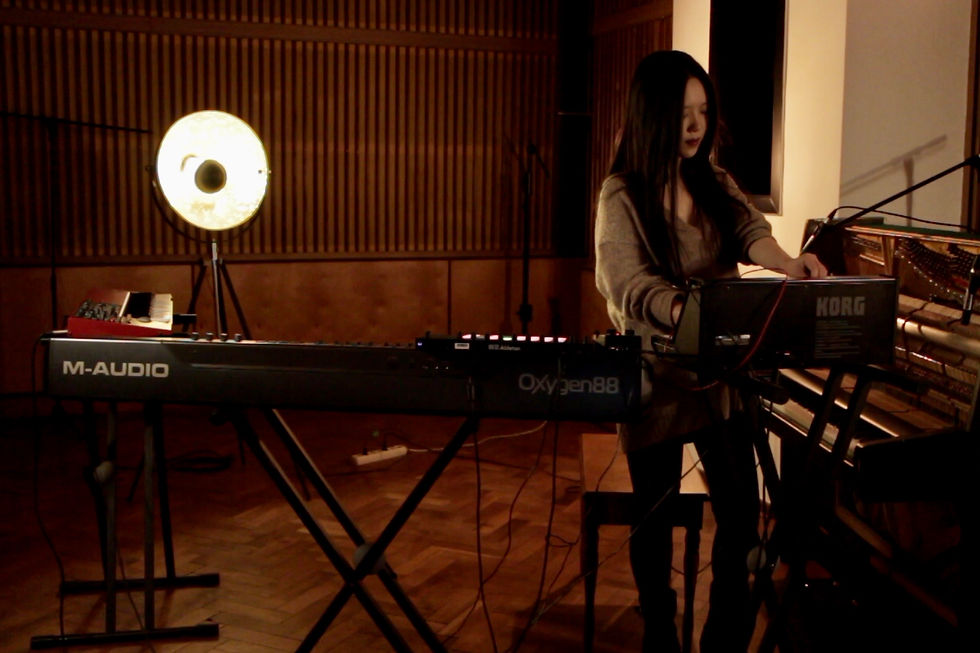
I envisioned “endless spells” as a live performance work from the outset of my creative process. The piece includes the following elements:
an analog loop running from beginning to end, with subtle changes throughout
restless notes generated by an arpeggiator, interacting with the loop
dreamy chords created with a Nord Lead
the piano theme, played on acoustic piano
a drone from a Korg MS-20 mini
special sound samples that I designed in Ableton
My guiding performance principle was visual and sonic authenticity: let the audience see how, when and where each sound originates, and how the performer changes the sounds my making adjustments on the gear. Therefore, I set out to control as many elements as possible live, to create and adjust basically everything that makes up the piece in real time, in plain sight.
After a few experiments, I was forced to admit the limits of my power as a single human being. I realized that to achieve my most vital purpose – delivering a successful performance that provides the same listening experience as the original composition – I would have to make a few compromises.
I first eliminated impossible acts. When the music demanded that I perform three movements at once, I had to get rid of at least one of them. Even then, the remaining elements added up to too many actions for one performer, even though I wanted an “active on stage” aesthetic.
I turned my attention next to the changes in the loop throughout the piece. Since most of the necessary parameter adjustments can only be made in the hardware, making them in real time while performing other elements of the piece would be extremely impractical at best, and probably impossible. Still, the loop is in many ways the lead sound of the piece, so it made sense to make it a focal point of the performance.
In the end, I created a return channel for the loop audio, allowing me to automate the changing echo effect. I took the same approach with the arpeggiator. This compromise meant losing the ability to make the adjustments live, but keeping the dynamic nature of the sounds during the performance.
The next riddle I had to solve related to the fact that I use the same keyboard input for several different sounds. The challenge lies in selecting the different channels in Ableton Push in real time to switch sounds. The order of these changes is not too difficult to remember, but the time available to make the changes can be very short.
Here, I simply automated the switching on and off of each channel, and problem solved. I would guess that this is a common technique in live performance, but it was still a new discovery for me.
"As you brainwashed by tri"

This track was created mainly by sampling all the sounds that I felt connected with at the time, and then having them interact with the piano melody line. As with “endless spells”, when I first started imagining strategies to perform the track live in a fulfilling way, all sorts of difficulties arose.
My original idea was to loop the piano line, which seemed feasible since many parts of the melody sound similar. I could record and sample a stanza of the piano part, and then add changes like shifting the octave. In this way, I thought, I would make myself available to control the other elements of the piece live.
Yet however similar the piano melody might be throughout the piece, each chord has subtle differences from the others. Looping the track would mean losing too much of the spirit of the piano part.
In the end, I decided to go the opposite way from my original plan. I would play the piano continuously for the live performance, and only make other adjustments when I had one hand free while the other kept playing. Fortunately, this approach is practical, as the piano part is minimalistic and generally easy to play.
For the experimental electronic elements, my first thought was to convert all of the sampled sounds onto hardware instruments that would be accessible on stage, like the Eurorack or Korg MS-20 mini.
As I started putting this idea into practice, I successfully recreated a sine wave tone similar to the sine wave sample that runs throughout the original track. I could also change the tone into a drone sound, allowing me to perform live the drone sound used in the second half of the piece.
For other sounds, the process was not so easy. For starters, the digital “glitch” artifacts that I love are impossible to convert. And even though I could recreate some buzz and white noise sounds live, it would be incredibly challenging to adjust them while playing piano. I also found that even when the recreated sounds were very similar to the sounds I originally sampled, I still lost a lot of my emotional connection to the sounds.
As I kept struggling, my tutor mentioned something that I found quite enlightening: “Since the track is created by sampling skill, then it would be a good idea to think of ways to make controlling the samples interesting.”
With this thought in mind, I started exploring the possibility of defining the live presentation of this piece as a sampling-based performance. That meant focusing on ways to control the samples.
I thought back to a performance I once did with two other artists, using a creative controller – the game controller you can use to vary parameters in Ableton.
Inspired by this memory, I looked for a sample controller that would allow for enough creativity. Yet the effect of the sampler I found was mostly just weird, which isn’t a bad thing but didn’t fit the atmosphere I wanted to create in the performance.
Sometimes, the most achievable and convenient thing is also the best.
Ableton Push has the option of assigning a different color to each sample, and it can easily accommodate 64 samples. I initially wanted to design an artistic graphic with the sample controller, to add more visual charm. Unfortunately, I couldn’t think of any graphic that made sense.
Also, in order to perform this piece, I have to remember the timing to play each sample. The piece has about 20 moments when a sample must be started. The process is ten times harder when you also have to remember which sample pad is which color, and which sound it makes.
Just for practice, I laid out the samples in a way that helped me remember the order. As luck would have it, the graphic turns out quite artistic in this layout. Unintentional positive outcomes can be the best outcomes of all.


Comments